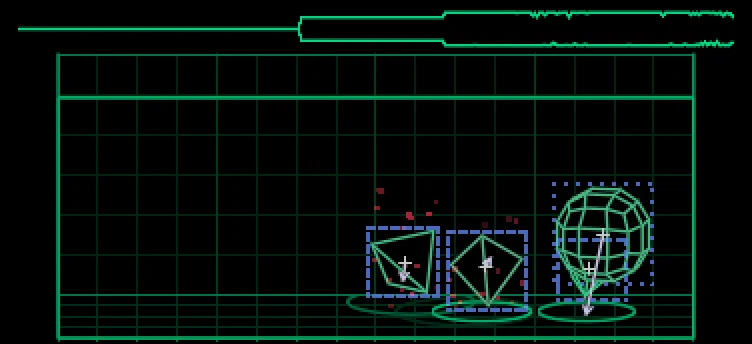
A drum engine whose page is a physics simulation: every hit throws a solid into a virtual box, and what it does shows the key's sound. Its size is the pitch, its bounce the decay, its throw the sweep, its debris the noise, and a scope along the top draws the sound. It follows the endless sequencer's transposition and your colour theme. SIM draws with orbit3d, which goes in mods beside it.
Keys
- drum: shift + T1 › sim
- T1, for each key: blue pitch, green decay, white sweep, orange noise
- shift + the encoders: colour, shape, choke, drive
Details
- Plugin:
opus.sim, version 0.1.9, as in the Opus 2.0 beta 4.2 starter pack
- Needs: Opus 2 with core 2.24 or later; orbit3d 0.2.5 or later, in
mods beside it
- Memory: 46 KB of the plugins’ 6 MB, loaded
- CPU: 113,165 cycles, 19.5% of one audio block (580,525 cycles)
- SHA-256:
1492588fc663cab4c618d18ccdd98b425fd93ac710513a53b28bbd246eefb050
Install
Put the OP-1 in disk mode (shift + com, then T3) and copy the .opmod file into the mods folder on its disk. Eject the disk on the computer: the OP-1 leaves disk mode and loads the plugin at its next start. Opus 2 has to be installed first: opus-op1.pages.dev.
Licence
© LizardMan, free to use and share, source not published yet.
Releases
The version in the Opus 2.0 beta 4.2 starter pack.
-
-
Opus Opus 2, core 2.24 or later
· last confirmed by the author, 16 Nov 2026
File details
- Format
- Opus plugin
- SHA-256
1492588fc663cab4c618d18ccdd98b425fd93ac710513a53b28bbd246eefb050