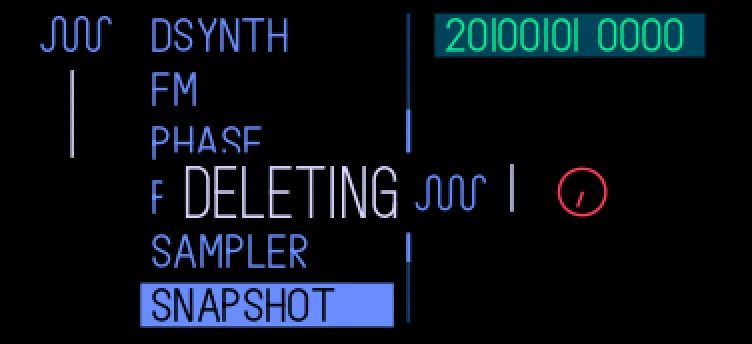
Overwrite save, rename and delete for the presets you saved, in one plugin. It replaces Opus 1's rename and overwrite save: an OP-1 with their old files loads preset tools, deletes the two and says "replaced".
Keys
- hold synth + hold 1–8: overwrite
- in the browser: orange push: name it
- in the browser: shift + white push, held: delete
All of them: the mods page (menu, T2), preset tools selected, green push.
Preset tools, step by step
- Overwrite: on the synth or drum screen, hold synth (or drum) and hold one of 1–8 through the save clock. The sound replaces its own saved preset instead of making a new one, and the popup says OVERWRITING.
- Name: open the preset browser with shift + 1–8, select a preset you saved yourself and push orange. A blinking _ shows after the name.
- Turn orange anticlockwise to delete the last character. Turn blue for a letter, green for a digit or white for a symbol, then push the encoder you turned to keep it (push again with nothing turned for a space). Push orange to save the name.
- Delete: in the browser, on a preset or kit you saved, hold shift and push white and keep it held. The save clock counts down and the preset is gone when it's done. Let go before then to cancel.
Factory presets keep their names. Any other key while naming puts the old name back.
A name is up to 13 characters: lowercase letters, digits, the symbols ! # + , - . ; = and spaces. If every character blinks as a ? for 2 seconds, the name was refused: it's empty, starts with a dot, another preset in the folder has it, or the disk is full.
Details
- Plugin:
opus.presettools, version 1.0.1, as in the Opus 2.0 beta 4.2 starter pack
- Needs: Opus 2 with core 2.20 or later
- Memory: 32 KB of the plugins’ 6 MB, loaded
- CPU: none: no audio of its own
- SHA-256:
54ff0707e5694c352846add7c5131844d4b271ecf9e73c593094c8ead5482ead
Install
Put the OP-1 in disk mode (shift + com, then T3) and copy the .opmod file into the mods folder on its disk. Eject the disk on the computer: the OP-1 leaves disk mode and loads the plugin at its next start. Opus 2 has to be installed first: opus-op1.pages.dev.
Licence
© LizardMan, free to use and share, source not published yet.
Releases
The version in the Opus 2.0 beta 4.2 starter pack.
-
-
Opus Opus 2, core 2.20 or later
· last confirmed by the author, 16 Nov 2026
File details
- Format
- Opus plugin
- SHA-256
54ff0707e5694c352846add7c5131844d4b271ecf9e73c593094c8ead5482ead