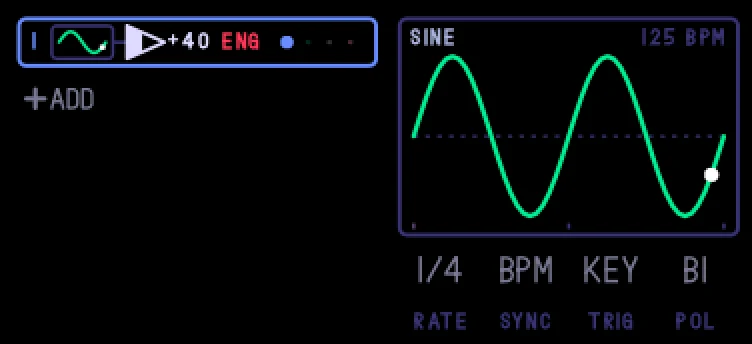
An LFO matrix in the OP-1's own LFO list. Up to eight rows on one page, each an LFO (sine, triangle, saw up or down, square, sample and hold; 0.1 to 50 Hz, or a note length from 4 bars to 1/32 synced to the tempo) or an envelope per note, with an amount and a destination: the engine's knobs and their shift layer, the amp envelope, the effect's knobs, the sound's volume, pitch, ring or duck, or another row's amount. Its settings are saved with the sound.
Keys
- shift + T4 › matrix
- its page on T4: blue row, green source, white amount, orange destination
- shift + the encoders: rate, sync, restart, polarity
The matrix, step by step
- On the synth (or drum) screen, press shift + T4 and turn to
matrix in the LFO list. Its page is on T4.
- Turn blue to pick a row. Push blue to add a row, or to switch the selected one off and on. shift + blue push removes it.
- Turn green for the row's source: an LFO shape (sine, triangle, saw up, saw down, square, sample and hold) or an envelope.
- Turn white for its amount (push white to flip its sign), and orange for its destination: the engine's knobs and their shift layer, the amp envelope, the effect's knobs and their shift layer, volume, pitch, ring, duck, or MOD, another row's amount.
- Hold shift and turn: for an LFO, its rate, Hz or note lengths, restart on each note or free, and bipolar or unipolar; for an envelope, its attack, decay, sustain and release (1 ms to 10 s each). fn + a turn steps finely.
Rows on the same destination add up. The envelopes' curve (linear, exponential or log) is a setting: the mods page, matrix selected, blue push.
The matrix is saved with the sound and its presets. Under stock or another firmware, the sound loads with a MIDI LFO at rest.
Details
- Plugin:
opus.matrix, version 0.5.1, as in the Opus 2.0 beta 4.2 starter pack
- Needs: Opus 2 with core 2.22 or later
- Memory: 20 KB of the plugins’ 6 MB, loaded
- CPU: small
- SHA-256:
522a0e547e5c6ac15a603725a44f4fdabc89c6f9aa644c36174d7ec2f1bfc838
Install
Put the OP-1 in disk mode (shift + com, then T3) and copy the .opmod file into the mods folder on its disk. Eject the disk on the computer: the OP-1 leaves disk mode and loads the plugin at its next start. Opus 2 has to be installed first: opus-op1.pages.dev.
Licence
© LizardMan, free to use and share, source not published yet.
Releases
The version in the Opus 2.0 beta 4.2 starter pack.
-
matrix.opmod
23.5 KB · ↓ 0
-
Opus Opus 2, core 2.22 or later
· last confirmed by the author, 16 Nov 2026
File details
- Format
- Opus plugin
- SHA-256
522a0e547e5c6ac15a603725a44f4fdabc89c6f9aa644c36174d7ec2f1bfc838