3.3 latest
From the hundekraft 3.3 release.
-
vox.knl 29.4 KB · ↓ 1
- hundekraft
File details
- Format
- hundekraft (kennel) plugin
- SHA-256
b8f8162c169bcf974aafeae156a95e948876df2c60df4e9216dff31ec4cd1147
Your voice, played on the keys.
Sing or talk into the OP-1, hold a chord, and VOX puts your words on those notes. The keys play a synth sound and your voice shapes it, so the chord you hold talks or sings. VOX takes your voice from the OP-1's input, like Amp: the mic, line, radio or USB. It splits your voice into up to 24 bands, and each band opens the same band of the synth. Chord mode, scale mode, the sequencers and MIDI all play the keys as usual.
To load it: synth then Shift + T1 pick vox
Note: With the built-in mic, use headphones. Through the OP-1's speaker the mic picks up VOX's own output and it feeds back, so it only half works.
To use it:
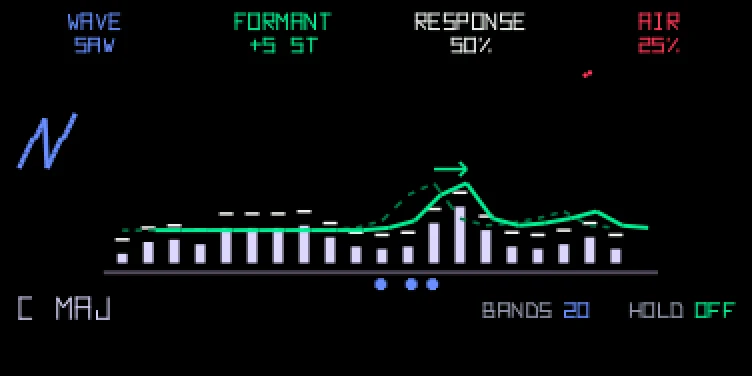
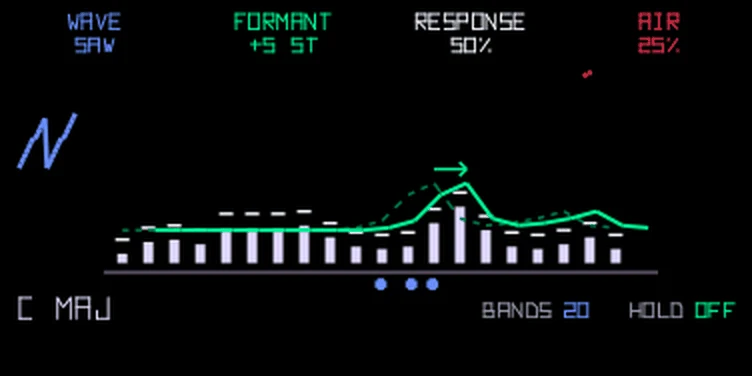
The bars are the bands, and they move with the sound you hear. Each knob's setting is written under its name at the top. The green lines are your voice: the dim dashed one is how you sang it, and the solid one is where FORMANT moves it, with a small arrow pointing the way it went. The blue wave on the left changes with WAVE, red sparks grow with AIR and flash on "s" sounds, and the keys you hold show as blue dots with the chord's name. BANDS and HOLD from page 2 are always shown small at the bottom right, so you only need page 2 to change them.
| Knob | Control | Turn | Push |
|---|---|---|---|
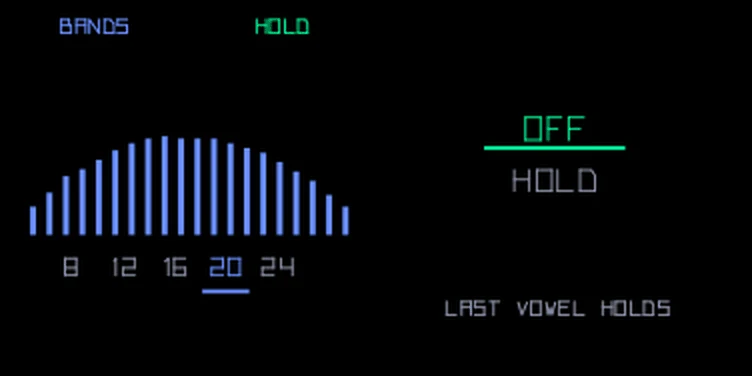
| blue | Wave | The synth sound your voice shapes: saw, then square, then a thinning pulse, then a stack of three saws, then noise | Bands: 8, 12, 16, 20 or 24. More bands are clearer, fewer sound more robotic. A new sound has 20 |
| green | Formant | Moves your voice up or down the bands, up to 12 semitones each way. Down sounds bigger, up sounds smaller. The pitch stays the same | Hold: Off or Hold |
| white | Response | Left is smooth and slow, right is sharp, fast and robotic | back to the middle |
| orange | Air | Lets the breath and the "s" and "t" sounds through, so words are easier to follow | back to where a new sound starts |
Push blue or green for page 2. Both knobs switch, so you can set Bands and Hold in one go; push either one again to go back. With Hold on, VOX keeps the last vowel you sang while you hold the keys, so you can sing a vowel, stop, and let the chord ring on with it. Let go of the keys and it lets go of the vowel. The settings save with the sound.
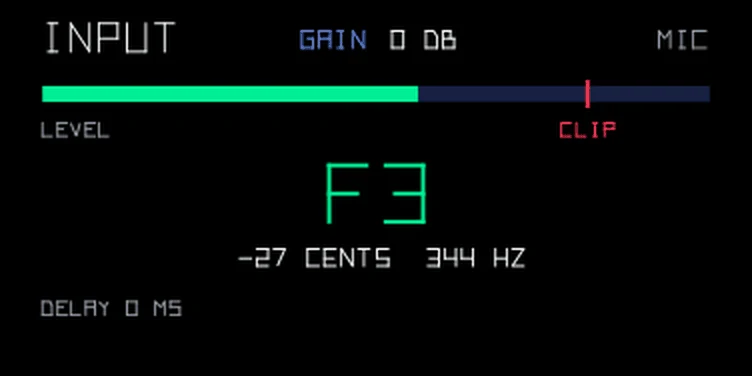
T2 shows the input instead of the envelope: the source, the input gain, a level meter with a clip mark, and the note you're singing. Turn blue to set the gain, from -12 to +24 dB in 1 dB steps. Turn it up for a quiet mic, but keep the meter out of the clip mark. The gain belongs to the source, not the sound: mic, line, radio and USB each keep their own, and SNAP and Amp use the same one. Use T3 to add an effect. The LFO on T4 moves Wave.
| Starting point | blue | green | white | orange | Notes |
|---|---|---|---|---|---|
| Robot choir | 0% | 50% | 92% | 37% | Saw and a fast response. Preset: robot choir. |
| Whisper | 100% | 50% | 50% | 85% | Noise instead of a note: whispered words. Preset: whisper. |
| Glass throat | 49% | 71% | 67% | 61% | Formant up for a smaller, glassy voice. Preset: glass throat. |
| Talk bassoctave −1 | 0% | 38% | 61% | 6% | A bass line that talks. Preset: talk bass. |
Each bar is a share of that encoder’s range. The encoders turn endlessly, so use it as a guide while you watch the screen. Where a preset is named, it’s in the workshop’s preset pack.
There are twelve VOX presets: robot choir, night radio, whisper, glass throat, basement, string speak, one vowel, talk bass, phone line, breathy choir, talk lead and toy voice. One vowel has Hold on.
From the hundekraft 3.3 release. Full manual
From the hundekraft 3.3 release.
b8f8162c169bcf974aafeae156a95e948876df2c60df4e9216dff31ec4cd1147