3.3 latest
From the hundekraft 3.3 release.
-
snap.knl 34.8 KB · ↓ 1
- hundekraft
File details
- Format
- hundekraft (kennel) plugin
- SHA-256
0dab5f1e4b432b255fd01474c644cd31f90b8bf15bd8f27a168b250afd548099
Pitch correction, from polite to obvious.
SNAP pulls your singing onto the notes. It takes your voice from the OP-1's input, like Amp, and moves each note you sing to the nearest note of the key. Set gently, it nudges a shaky note into tune so nobody notices. Set hard, every note snaps to the key, the sound everyone knows from the radio. Hold keys and each one adds a copy of your voice at that key's pitch, with the key's envelope, so one chord gives you a small choir of yourself. A tuner needle shows how far off you sang.
To load it: synth then Shift + T1 pick snap
Note: With the built-in mic, use headphones. Through the OP-1's speaker the mic hears SNAP's own output instead of your voice, and SNAP can't find your pitch.
To use it:
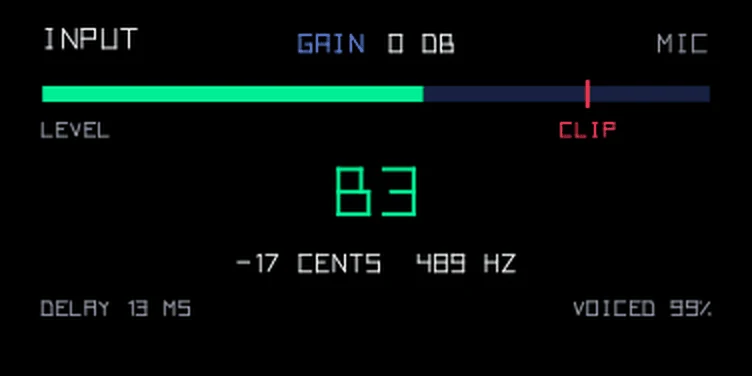
Your voice comes out about 13 ms late, the time SNAP needs to hear a note's pitch.
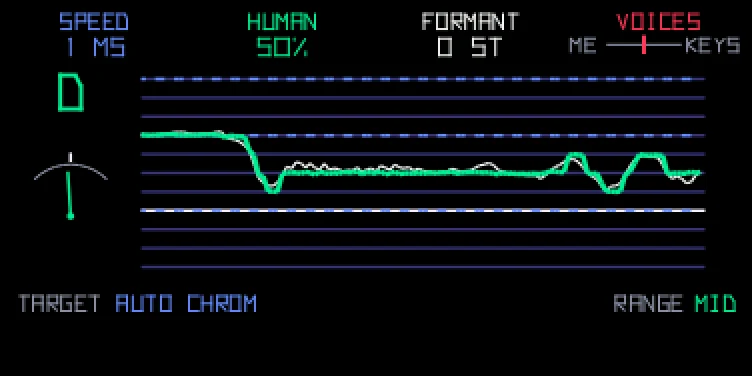
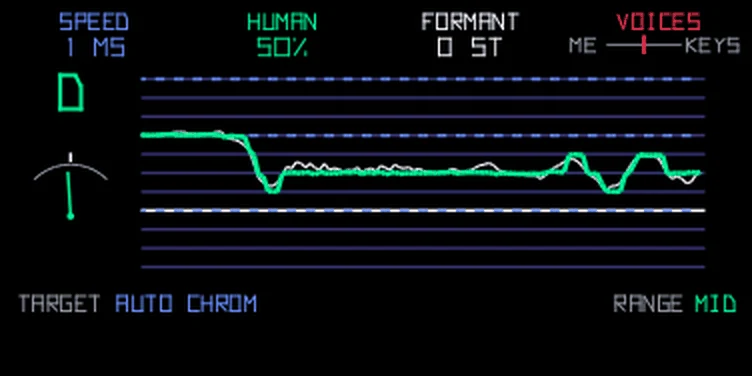
The lines are the notes. The thin white line is the pitch you sing and the thick green one is where SNAP puts it, so you can see it step from note to note. Each key you hold adds a blue dashed line at its pitch: that's your choir. On the left is the note SNAP is pulling you to, with a needle under it like a tuner's. It leans left when you sing flat and right when you're sharp, and points straight up when you hit the note. Each knob's setting is written under its name at the top (VOICES as a small slider from ME to KEYS), and TARGET and RANGE from page 2 are always shown at the bottom.
| Knob | Control | Turn | Push |
|---|---|---|---|
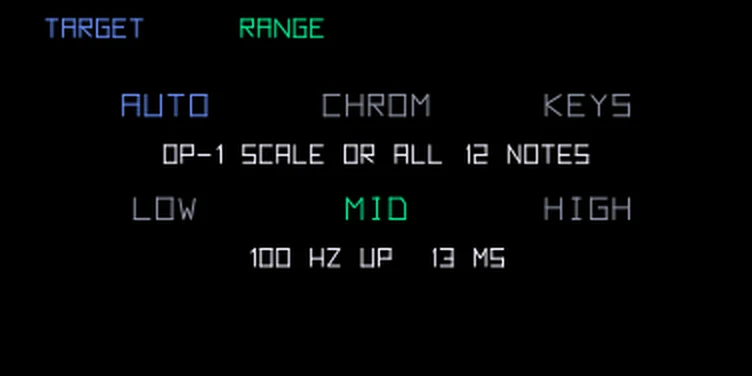
| blue | Speed | How fast your pitch moves to the note. All the way left it jumps from note to note, the robotic sound from pop records. Turn right for a slower glide that sounds more natural | Target: Auto, Chrom or Keys |
| green | Human | Lets long notes and almost-right notes move more freely, so vibrato and small slides stay in | Range: Low, Mid or High |
| white | Formant | Makes your throat sound bigger (left) or smaller (right) without changing the pitch | back to 0, your own voice |
| orange | Voices | Left is your corrected voice alone. The middle adds the voices from the keys you hold. Right is the key voices alone | back to the middle |
Push blue or green for page 2. Both knobs switch, so you can set Target and Range in one go; push either one again to go back.
T2 shows the input instead of the envelope: the source, the input gain, a level meter with a clip mark, the note SNAP hears and the delay. Turn blue to set the gain, from -12 to +24 dB. Like VOX's, it belongs to the source and not the sound. Use T3 to add an effect. The LFO on T4 doesn't move SNAP's knobs. The settings save with the sound.
There are twelve SNAP presets: hard snap, natural, choir of one, keys only, duet, slow glide, big throat, small throat, bright singer, choir pad, low singer and voice lead.
From the hundekraft 3.3 release. Full manual
From the hundekraft 3.3 release.
0dab5f1e4b432b255fd01474c644cd31f90b8bf15bd8f27a168b250afd548099