3.3 latest
From the hundekraft 3.3 release.
-
lineclock.knl 12.6 KB · ↓ 1
- hundekraft
File details
- Format
- hundekraft (kennel) plugin
- SHA-256
c89d6cb51c9e84ee9ce674ca172ce40b723b32329093db4fe29d74981be19f57
Follow a pulse clock from the line-in jack.
Line clock lets a drum machine or a modular set the OP-1's tempo through a cable in the line-in jack. It reads clock pulses on the input and turns them into MIDI clock. Set the tempo screen's sync to follow MIDI, hold Shift and push blue to pick the RATE your clock sends, and plug the clock into line in.
Warning: Eurorack clock and gate outputs are often 5 to 10 V, far hotter than the line input is made for, and can damage it. Turn a modular's gates down to about 1 V with an attenuator, or use a line-level clock output, and start with the level turned down.
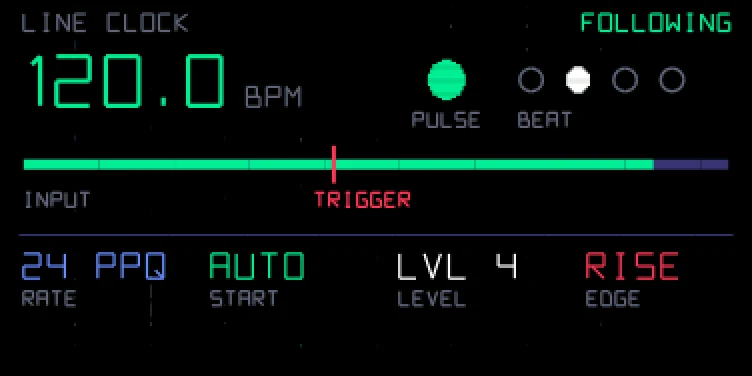
Hold Shift on the tempo screen to see the line clock panel. It covers the screen. At the top it says what the clock is doing: FOLLOWING, WAITING, USB CLOCK, OFF or NOT READY. While it follows, you see the tempo it reads, a PULSE lamp that flashes on every pulse, and four BEAT dots that show the beat. When something is missing, the panel names the one step to take instead of the tempo: set sync to MIDI in, plug into line in, turn the rate on, or wait for the USB clock to stop.
Under that is the input level, with a red TRIGGER mark at the level a pulse must reach. The bar is green while the input is above the mark. The four columns at the bottom sit under the encoders, each in the colour of the encoder that sets it.
| Control | Does |
|---|---|
| Shift + push blue | RATE: off, 24, 4, 2 or 1 pulses per quarter note (PPQ). It starts off. Match it to what your clock sends: 1 for one pulse a beat |
| Shift + push green | START: auto plays on the first pulse and stops when the pulses stop. Manual leaves play and stop to you |
| Shift + turn white | LEVEL: how loud a pulse must be to count, 1 to 8 |
| Shift + push or turn orange | EDGE: count the rising or the falling edge |
Turning blue and green with Shift still does what it always did on the tempo screen. To set sync to MIDI in, turn green without Shift.
While pulses are coming in, the input is muted so the clicks aren't heard or recorded. With no clock plugged in, line in works as usual, for VOX and SNAP too. A USB MIDI clock wins: line clock steps aside while one is coming in. The input takes line level.
Line clock is a port of Pulse Sync by ESC_CODE.
Credit: hundekraft, after Pulse Sync by ESC_CODE.
From the hundekraft 3.3 release. Full manual
From the hundekraft 3.3 release.
c89d6cb51c9e84ee9ce674ca172ce40b723b32329093db4fe29d74981be19f57