3.3 latest
From the hundekraft 3.3 release.
-
keyvel.knl 6.2 KB · ↓ 1
- hundekraft
File details
- Format
- hundekraft (kennel) plugin
- SHA-256
cc04391f5559f340b027c02fc4eefff826b12ab28abbd4480798a360f91e6cad
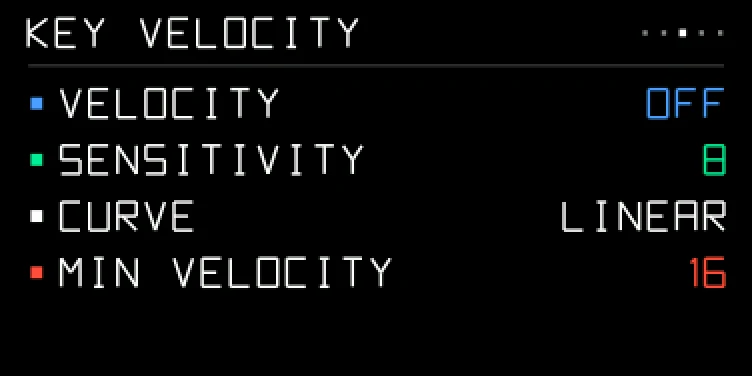
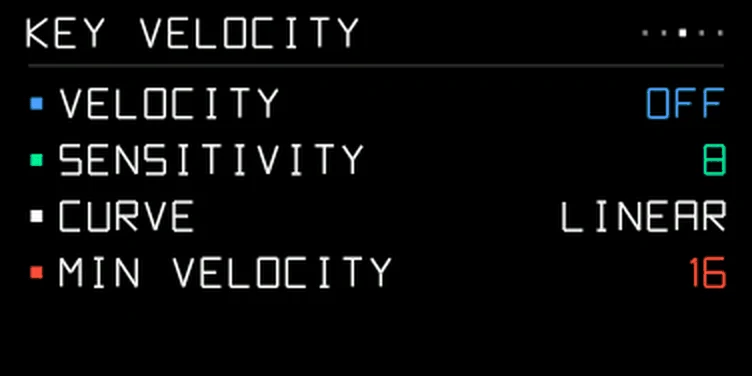
The OP-1's keys don't sense how hard you press them, but its accelerometer feels each key hit the case. With VELOCITY on, a harder hit plays a louder note. It starts off, and while it's off nothing changes. Only the keys use it: notes from MIDI and from the sequencers keep their own velocity.
To open its page, press Shift + help, then T3, then hold Shift and turn blue to KEY VELOCITY. Page 11 of the resource monitor shows each hit and each key's range, which helps when you set SENSITIVITY.
| Encoder | Row | Values |
|---|---|---|
| blue | VELOCITY | ON or OFF |
| green | SENSITIVITY | 1 to 16. Higher reaches full velocity with a lighter hit |
| white | CURVE | SOFT gives loud notes easily, HARD needs a firm hit, LINEAR is in between |
| orange | MIN VELOCITY | 0 to 120: the velocity of the softest press |
From the hundekraft 3.3 release. Full manual
From the hundekraft 3.3 release.
cc04391f5559f340b027c02fc4eefff826b12ab28abbd4480798a360f91e6cad