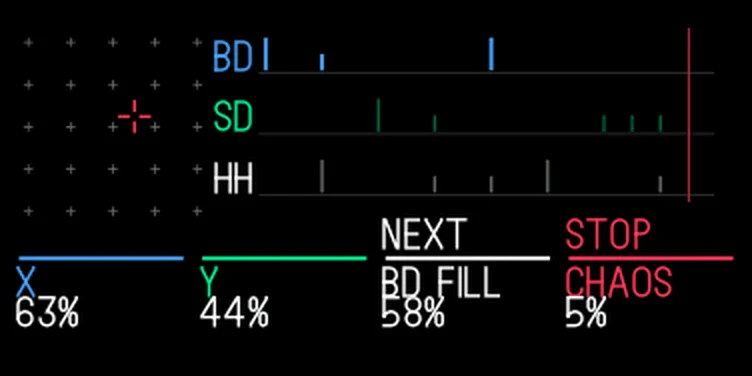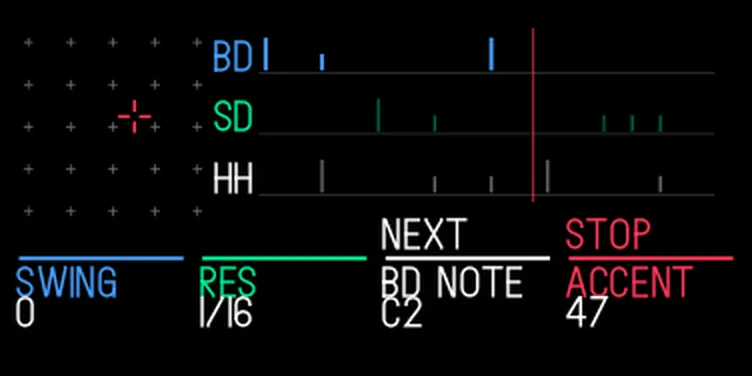
A map of drum patterns, after Mutable Instruments Grids.
Grids plays three parts, BD, SD and HH, from a map of drum patterns. Move the point around the map with X and Y and the patterns morph from one groove into the next. Fill sets how busy each part is, and Chaos adds random variation. It's pcppcp's port of Émilie Gillet's Grids module.
Pick Grids with Shift + seq, then press seq to open its page. It starts stopped: push orange to play, and again to stop. It follows the OP-1's tempo, and a MIDI start sends it back to the first step. Synth and drums each have their own Grids settings, and they're kept after a restart.
| Encoder |
Turn |
Shift + turn |
Push |
| blue |
X: position on the map |
Swing |
|
| green |
Y: position on the map |
Resolution: 1/16 or 1/32 |
|
| white |
Fill of the selected part |
The selected part's pad (drums) or note (synth) |
Select the next part: BD, SD, HH |
| orange |
Chaos |
Accent amount |
Play or stop |
On the drums each part plays one pad; out of the box that's the kick, snare and closed hat. On a synth the parts play notes. While you hold keys on the Grids page, those keys set the notes: the lowest goes to BD, the middle one to SD and the highest to HH. Let go and Grids goes back to the stored notes. Away from the Grids page, keys play as usual.
Credit: op1r · after Mutable Instruments Grids by Émilie Gillet.
From the hundekraft 3.3 release. Full manual
Releases
From the hundekraft 3.3 release.
-
grids.knl
13.3 KB · ↓ 6 · from GitHub
File details
- Format
- hundekraft (kennel) plugin
- SHA-256
0a429dd500a7b56abdb886a7ed195ffe27e2346ef8dd38a46d6caba9594a042d- Kept at
- The author’s GitHub. The download is counted here and passed on there; the size and SHA-256 are of the file as it was when this release was listed.