3.3 latest
From the hundekraft 3.3 release.
-
composer.knl 100.0 KB · ↓ 1
- hundekraft
File details
- Format
- hundekraft (kennel) plugin
- SHA-256
ac16ff73ff52706900370679eca5ef901b8735ae1837b6b78a8594990224359d
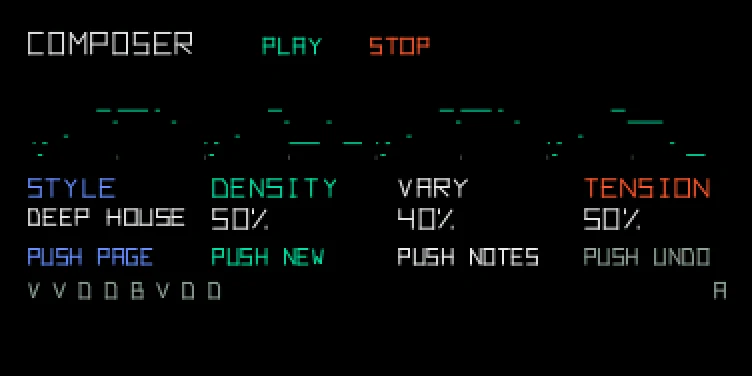
Hold a key, get a whole song.
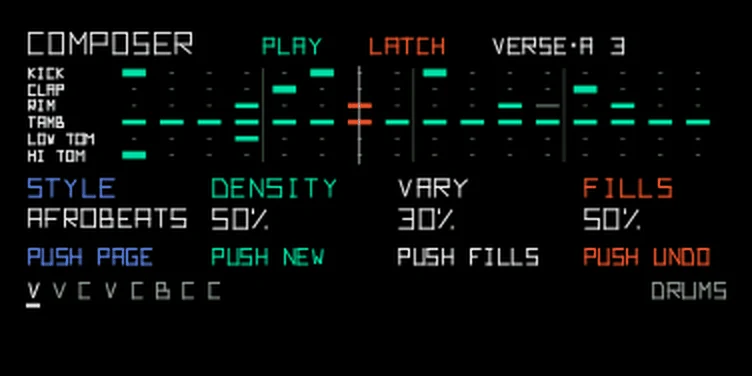
Pick a style and hold a key: Composer writes a whole song, with verse, chorus and bridge and proper chord changes. There are 43 styles, from deep house and drum & bass to bossa nova, ragtime and film noir, and each brings its own chords, grooves and song form. A song is built from 8-bar sections: A is the verse, B the chorus (the drop in club styles), C the bridge (the break in club styles, funk and nu-disco). Pop runs A A B A B C B B, lo-fi just A A B A. The first time a section comes round it plays as written. After that it changes a little each time, as much as Vary allows. Change the style while it plays and the next bar follows.
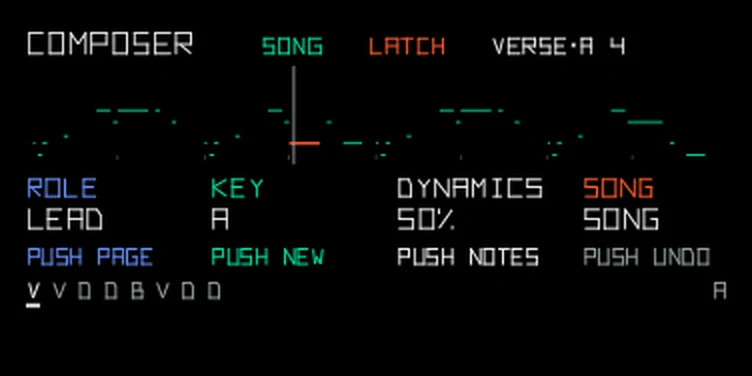
Pick Composer in the sequencer browser: hold Shift and press seq, turn blue to composer, then press seq to load it. With seq on, hold a key to play the song and let go to stop. Hold Shift while you let go and it keeps playing; stop stops it. While it plays, the top line names the section, then a letter for which pass of it this is, then the bar. VERSE·A 3 is the verse as written, in bar 3; CHORUS·B is the chorus the first time it comes back changed. After D it starts again at A. The row at the bottom shows the style's song form, one letter per section (V verse, C chorus, D drop, B bridge or break), with the section playing now underlined. On the drum page Composer plays the drums for the same song, with a groove of its own for every style: see Drums below.
To change the harmony on the fly, hold another key while the song plays. From the next bar the music follows the chord on that key, and it goes back to the song's own chords when you let go. The song's key never moves, so parts you record stay in tune with each other.
| Encoder | PLAY page | SONG page |
|---|---|---|
| blue | Style (the list is below) | Role: lead, bass, arp or chords. A part the style doesn't have is skipped |
| green | Density: fewer or more notes | Key |
| white | Vary: how far a song strays from the style's usual chords and rhythms, and how much repeats change | Dynamics: how much louder the accents are than the soft notes. At 0 every note plays at the same level, 50 is the style's own, 100 makes the accents harder and the ghost notes softer |
| orange | Tension: how freely the melody leaves the chord | Song: SONG plays the style's song form, LOOP repeats the verse, B ONLY and C ONLY hold the chorus or the bridge |
The styles, in the order blue goes through them: deep house, techno, trance, synthwave, pop, lo-fi, city pop, ambient, IDM, drum & bass, garage, acid, dub techno, breakbeat, nu-disco, boom bap, trap, neo-soul, afrobeats, amapiano, reggaeton, bossa nova, ballad, blues, gospel, funk, folk, cinematic, chiptune, darksynth, vaporwave, film noir, canon, baroque, classical, romantic, chorale, ragtime, boogie-woogie, nocturne, impressionist, neo-classical and montuno. Three long names are shortened on screen: BOOGIE, IMPRESSION and NEOCLASSIC.
The last six are written for a piano engine. Their parts are called RIGHT and LEFT: record RIGHT on one track and LEFT on another. There's no separate bass or chords part, since LEFT plays both.
With Vary at 0, every song sticks to the style's usual chords and rhythms. Turn it up and new songs wander further: other chords from the style, a borrowed chord now and then, new rhythms built from the style's own. Tension makes the bolder chord moves more likely.
Some styles leave a part out. Boom bap, blues, film noir and chorale have no arp. Canon has no chords, because its arp figure already plays them, and the six piano styles have neither bass nor chords. Turning Role skips a missing part, so you never land on a silent one. Switch to a style that lacks the part you picked and Composer plays the style's next part instead. Your pick comes back with a style that has it.
The arp part plays a figure that suits the style, and the SONG page shows the figure's name where it would say ARP:
| Figure | What it plays | Styles |
|---|---|---|
| ARP | An arpeggio over the chord | Every other style with an arp |
| ALBERTI | Low, high, middle, high on the chord, the classical left hand | classical |
| BROKEN | A wide broken chord that climbs one and a half to two octaves and comes back | nocturne, impressionist, neo-classical |
| STRIDE | A bass note in octaves on 1 and 3, the chord on 2 and 4 | ragtime |
| BOOGIE | The rolling left hand, up the chord to the flat seventh and back in dotted 8ths | boogie-woogie |
| MONTUNO | A two-bar salsa figure in octaves with a chord note between, accented on the clave | montuno |
| TREMOLO | Two chord shapes trading every 16th, swelling through each chord | romantic, cinematic |
Push blue to switch between PLAY and SONG. Push green for a new song: new chords, rhythm and melody. Push white for new notes on the same rhythm. Push orange to undo the last change, and again to bring it back. Undo covers the style, song, role and key settings. Changes you make while it plays come in at the next bar. A push that has nothing to do right now is dimmed, such as undo with nothing to undo, or jump while Next shows -.
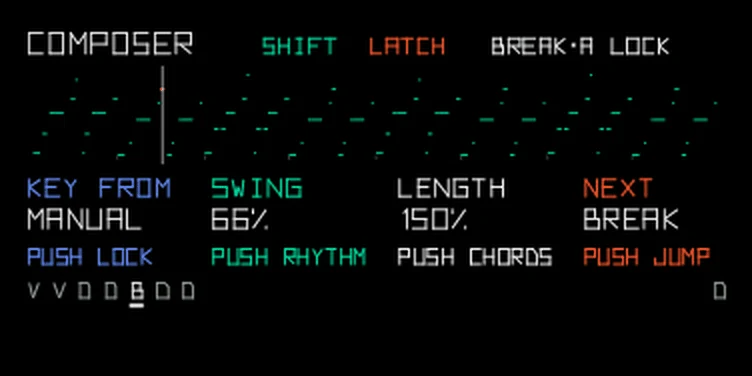
Hold Shift and the four columns show the Shift page:
| Encoder | Turn | Push |
|---|---|---|
| blue | Key from: FOLLOW takes the key from global Scale or Chord, MANUAL lets you set it on the SONG page | Lock: the section playing now repeats exactly, with no variation, until you push again. The top line shows LOCK |
| green | Swing: STYLE is the style's own swing, then 50 % (straight) up to 75 %. 66 % is close to a triplet feel | A new rhythm for the same notes |
| white | Length: STYLE plays the style's own note lengths, then 25 % up to 200 % of them | New chords |
| orange | Next: a section the style's song form uses, by name: VERSE, CHORUS or DROP, BRIDGE or BREAK | Jump: from the next bar the song goes to the start of that section. The top line shows NEXT and the section until then |
After a jump in SONG mode, the song form carries on from that section. With LOOP, B ONLY or C ONLY the section plays once and the mode takes over again. Push it while Composer is stopped and the next key starts at that section. Swing and length are saved with your settings, and undo works on them. Lock isn't saved.
To record Composer to tape, it works like the stock sequencers:
Don't press Shift + play to start the tape: that runs the tape backwards, and a recording goes backwards too.
To build a track, record one role at a time on its own tape track: bass first, then chords, then the lead, with the same style and song. Start every take at the same spot on the tape and press the key on the first beat, so the sections line up.
Composer writes drums for the same song. In drum mode, pick it the way you did on the synth page: hold Shift, press seq, turn blue to composer and press seq. Starting and stopping work the same too: hold a key to play, hold Shift as you let go to keep it going, and press stop to stop.
The drum page shares the song with the synth page: the style, the sections, swing, length and dynamics. Change the style on one page and the other follows. The drums move with the form. The chorus gets open hats, an extra kick and a crash on its first bar, the bridge drops to a breakdown or half time, and the bar before a new section ends in a fill. Every style has its own groove and uses the parts of the kit that suit it:
| Style | The groove |
|---|---|
| deep house | Kick on every beat, clap on 2 and 4, open hats on the off-beats with a shuffled closed hat after each, a rim |
| melodic techno | Kick on every beat, a soft clap, closed hats on the off-beats only, a few rim ticks |
| trance | Kick on every beat, snare and clap on 2 and 4, rolling 16th hats under open off-beat hats, snare-roll fills, crashes |
| acid | Kick on every beat, clap on 2 and 4, busy closed hats with accented off-beats |
| garage | A 2-step kick that skips beat 3, snare on 2 and 4, shuffled rims and hats |
| nu-disco | Kick on every beat, snare on 2 and 4, closed hat on the beat and open hat off it, tambourine 16ths |
| amapiano | Kick on every beat, shaker 16ths accented 3-3-2, a syncopated rim, a late clap |
| dub techno | Kick, soft open hats on the off-beats and rim echoes, nothing else |
| synthwave | Kick on 1 and 3, a big snare and clap on 2 and 4, straight eighth hats, tom fills |
| pop | Kick with pickups, snare on 2 and 4, eighth hats, tambourine on the off-beats |
| city pop | Syncopated kick, snare with ghost notes, 16th hats, an open hat at the end of the bar |
| funk | Busy kick, snare with ghost notes, 16th hats, an open hat, tambourine on 2 and 4 |
| gospel | Snare and clap together on 2 and 4 with the tambourine, eighths on the ride |
| ballad | Kick on 1 and 3, a cross-stick rim on 2 and 4 (the snare in the chorus), soft hats |
| folk | Kick on 1 and 3, cross-stick on 2 and 4 (the snare in the chorus), tambourine eighths |
| blues | A shuffle on the ride, snare on 2 and 4, the hat pedal on 2 and 4 |
| chiptune | A bouncy kick, snare on 2 and 4, noise hats in 16ths, all at one volume |
| boom bap | Swung kick, snare on 2 and 4, hats a touch behind the beat |
| lo-fi | A lazy kick, snare and hats played late and soft |
| trap | Half time: snare and clap on 3, a sliding kick, hats with triplet rolls |
| neo-soul | Behind the beat: cross-stick, ghost snares, a soft ride |
| darksynth | Half time, a heavy kick, snare and clap on 3, toms at the end of the bar |
| vaporwave | Slowed half time, a lazy kick, snare and clap on 3, tambourine on 2 and 4 |
| drum & bass | Two-step kick and snare, eighth hats |
| breakbeat | The amen break's kick and snare, ghost notes and all, over the ride |
| IDM | Broken kick and snare, uneven hats, a rim off the grid |
| reggaeton | The dembow: kick on every beat, the snare in a 3-3-2 |
| afrobeats | Syncopated kick, a clave on the rim, clap, shaker 16ths, talking-drum toms |
| bossa nova | A surdo-style kick, the bossa rim pattern, a soft ride |
| ambient | One kick a bar, a rim, a quiet shaker |
| cinematic | Taiko-style toms, one snare hit on 4, ride swells, crashes |
| film noir | Brushes: a light kick, the jazz ride, ghost snares, the hat pedal |
| canon | A soft kick, a rim on 3, timpani rolls on the toms |
| baroque | A pulse on every beat, rim and tambourine between, timpani at the cadence |
| classical | Kick on 1 and 3, a rim on 2 and 4, the ride in quarters |
| romantic | Timpani swells, one kick, the ride swelling through the bar, crashes |
| chorale | A kick each half bar, a rim on 4, tambourine on 2 and 4 |
| ragtime | A march: kick on 1 and 3, a rim on 2 and 4 (the snare in the chorus), a light hat |
| boogie-woogie | A kick on every beat, snare on 2 and 4, a shuffle on the ride |
| nocturne | Almost nothing: one kick, a rim, a slow ride |
| impressionist | Cymbal swells on the ride, timpani strokes, one kick a bar |
| neo-classical | A soft half-time pulse, a clap on 3, the ride in quarters, tom fills |
| montuno | The clave on the rim, cascara on the ride, congas on the toms, a shaker |
While the drums play, hold any other key to mute that key's pad, and let go to bring it back. Holding the kick key gives you a quick drop. The key you started with doesn't mute anything.
| Encoder | PLAY page | SONG page |
|---|---|---|
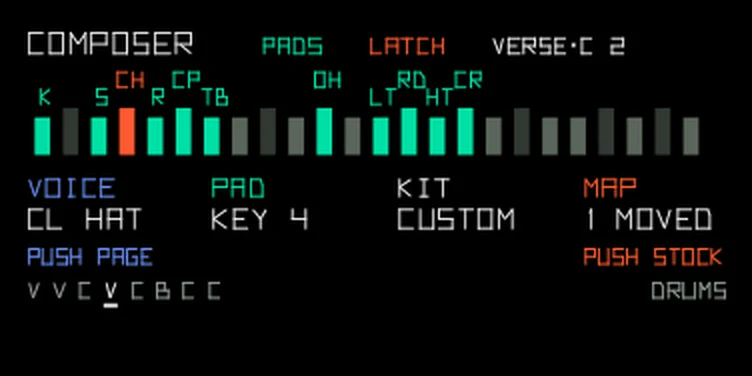
| blue | Style, the same list as on the synth page | Kit: STOCK uses the stock kit layout, CUSTOM your own pad map. Push it to open the PADS page |
| green | Density: fewer or more hats, or ride or shaker hits in styles that keep time on those | Ghosts: quiet snare or rim hits between the main beats. Higher up, the hats roll too |
| white | Vary: how much the groove changes from bar to bar and each time a section comes back. At 0 the drums play as written | Dynamics, shared with the synth page |
| orange | Fills: at 0 there are none. Turn it up for longer fills and more of them | Song, shared with the synth page |
Push blue to step through PLAY, SONG and PADS. Push green for a new groove, white for new fills, and orange to undo the last drum change, kit and pad changes included. Fills come in the last bar of a section before it changes, and now and then when a section repeats, so you hear a new fill the next time one comes round. At Fills 0 there are none and the push is dimmed. The Shift page works as on the synth page, with two drum pushes: green gives the kick and snare a new rhythm, white gives the hats and ghost notes a new pattern. Swing and length are shared. Lock and jump only touch the drums.
The OP-1 runs only the sequencer of the page you're on, so the drums and the synth part never play at the same time. Record the drums to a tape track of their own, then switch to the synth page and record the other parts over them, starting each take at the same spot.
Composer expects TE's standard kit layout, which the factory kits use. Counting keys from the left: kick on key 1, snare on 3, rim 5, clap 6, tambourine 7, closed hat 9, open hat 11, low tom 13, ride 14, high tom 15 and crash 16. The toms are a guess, because kits put different sounds on those keys. If your kit is laid out another way, open the PADS page, turn blue to a voice and press the key that has its sound. You hear the key as you press it. Turning green moves the pad one key at a time. Push orange to go back to the stock layout. The pad map is saved with the drum page's settings.
Turn Chord mode off for the lead and bass, or every note becomes a chord. Global Scale leaves Composer's notes alone: they are already in key. The octave keys move every role, so set each part's range with them. Your settings and the current song come back after a restart, with playback stopped.
From the hundekraft 3.3 release. Full manual
From the hundekraft 3.3 release.
ac16ff73ff52706900370679eca5ef901b8735ae1837b6b78a8594990224359d