3.3 latest
From the hundekraft 3.3 release.
-
chord.knl 59.3 KB · ↓ 1
- hundekraft
File details
- Format
- hundekraft (kennel) plugin
- SHA-256
9b4ba16a5d5832e0f98ad5b4d6ae2cec7bc7b0471ce5a2068803fad7394f3642
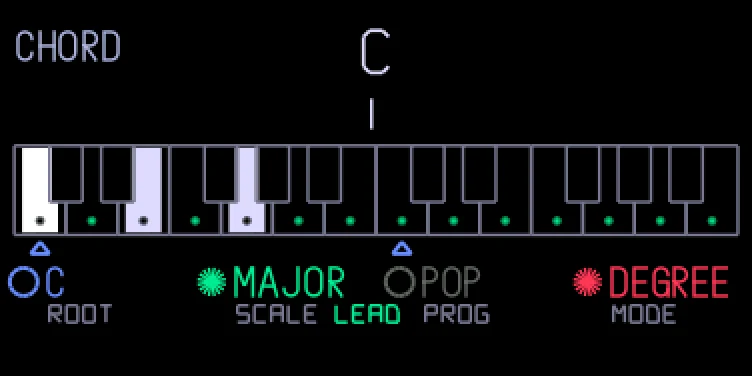
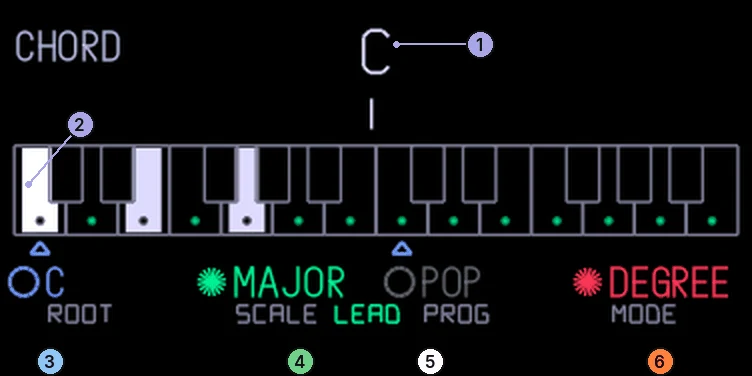
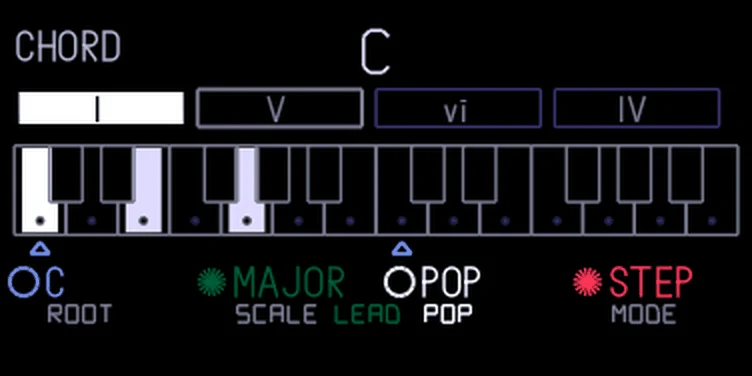
Chord mode turns every key into a chord. It knows about scales and progressions, so you can play a whole song with one finger. It works with every synth, including the stock ones, and with every sequencer. It's off until you switch it on.
| Encoder | Turn | Push | Shift + push |
|---|---|---|---|
| blue | Root note | Chord colour: triad, sus4, sus2, 7th, add9 | |
| green | Scale (13 to choose from) | What out-of-scale keys play: LEAD, PASS or BORR | Voice leading on or off |
| white | Progression (69, plus your own "mine"); with Shift, jump to the next group | Degree mode: record a progression (push again to stop). Step mode: restart it | Degree mode: clear "mine" |
| orange | Degree mode or step mode | Chords on or off |
A little star before a value means that encoder's push setting is on: a chord colour on blue, voice leading on green, recording on white, chords on orange. An open ring means it's off.
The scales are major, minor, dorian, mixolydian, lydian, phrygian, locrian, harmonic minor, melodic minor, phrygian dominant, pentatonic, minor pentatonic and blues.
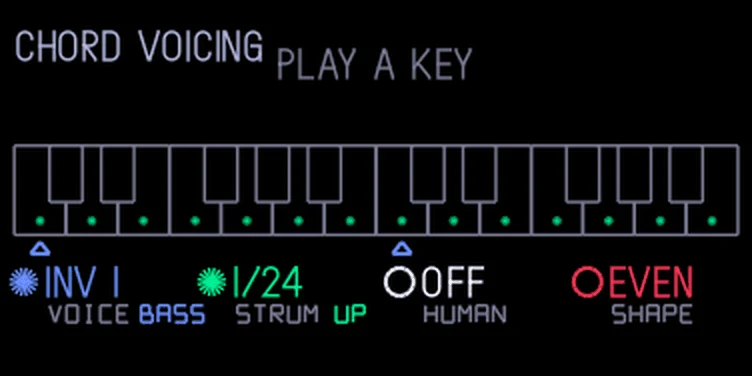
Hold Shift and push orange on the chord page to open page B. Do it again, or just push orange, to go back to page A.
| Encoder | Turn | Push |
|---|---|---|
| blue | Voicing: auto, inv 1, inv 2, inv 3, drop 2 or spread | Bass: add the chord's root an octave below |
| green | Strum: off, or 1/96 to 1/2 beat between notes | Strum direction: up, down or random |
| white | Human: off to 100 %. Each gap in a strum and each note's velocity drift a little at random | Drum chords on or off |
| orange | Shape: even; fade, where each later note is softer; or accel, where the strum speeds up like a quick hand | Back to page A |
On page B a star means the bass note, the strum or drum chords are on. Drum chords have no label of their own: the star under Human shows them.
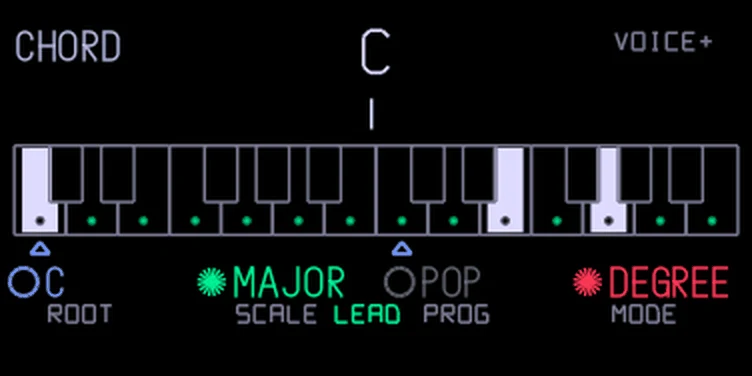
Auto is the normal voicing: voice leading picks the inversion. The other voicings are fixed shapes and ignore voice leading. With a strum set, the first note sounds at once and the others follow one by one. Human and Shape only change a strum, and velocity only makes a difference on sounds that respond to it. With drum chords on, a key on the drums also plays the chord's other notes as pads. When anything on page B is not at its default, page A shows VOICE+. Page B settings are kept after a restart.
Each key plays the chord that belongs to it in the chosen scale. In C major, C plays C major, D plays D minor, G plays G major, and so on. The key you press is always the bass note, so higher keys give higher chords, and the octave keys work as usual.
Turn orange to STEP. Now every key press plays the next chord of the progression on white. The key you press only sets the register. Hold Shift and press a key to step back.
The progressions come in seven groups, in this order:
Your own "mine" comes last. Hold Shift and turn white to jump to the first progression of the next or previous group; in step mode the group's name shows under white. Folia, romanes, pas.mez, mcanon, mcan2, mcliche, chacon, lament, aeolian, incept, citypop, mblues, neapol, phryg, picardy, chopin, dark, boss and dorian are minor progressions: they start from a minor chord on the root you set, whatever the scale.
Some progressions have chords with their own bass note: everything in the Bass group, plus gospel, neapol, phryg, pedal and chopin. They show as slash chords: G/B is G major with B in the bass. The chord sounds above its bass. In these progressions each bass note goes as close as it can to the one before, so the bass line walks up and down as written: canon's bass steps down C, B, A, G, F, E instead of jumping up an octave halfway. The key you press sets where the line starts, and the line stays within an octave of it. The name at the top shows the slash chord, and the tab shows the bass as a step of the key after the numeral, so V/7 is the V chord over the 7th. With Bass on (page B), the bass note is doubled an octave lower.
In degree mode, Shift + push white clears "mine". It follows the root, so you can transpose it with blue.
From the hundekraft 3.3 release. Full manual
From the hundekraft 3.3 release.
9b4ba16a5d5832e0f98ad5b4d6ae2cec7bc7b0471ce5a2068803fad7394f3642